Vectorize any image to clean vectors (SVG) in seconds!
VectorEZ is an easy-to-use image tracing application for Windows and macOS. Convert a logo, silhouette or raster image to vector graphics in only a few steps. Load an image, select a color channel, adjust the smoothness of the traced curves, and see the result immediately thanks to a fast preview. Finally, save the result in vector graphics format (SVG)!
No design skills required, VectorEZ is built for makers, hobbyists, and anyone who needs clean vectors fast.
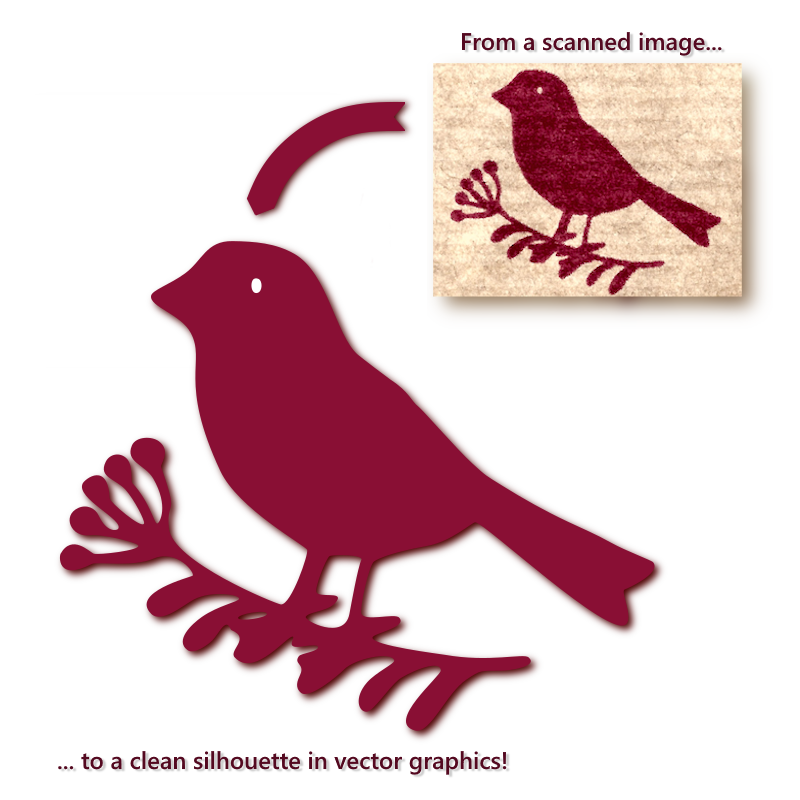
With VectorEZ capture the key features of an image in a small vector file!
Using an original method developed at Asteride Software, VectorEZ is able to vectorize an image with only a small number of anchor nodes. With its single-channel tracing, isolate exactly the contours you need. The key features of the input are preserved, and the result is a small, easy to edit, vector graphics file.

With a single slider the user controls the precision of the vectorization — how close the vector curve should fit to the input. Move the slider and watch the result displayed in real-time in the viewport. It is easy to find the good compromise between accuracy, aesthetics and output complexity!
Go to the gallery to see more examples of VectorEZ in action!
Why are vector graphics useful?
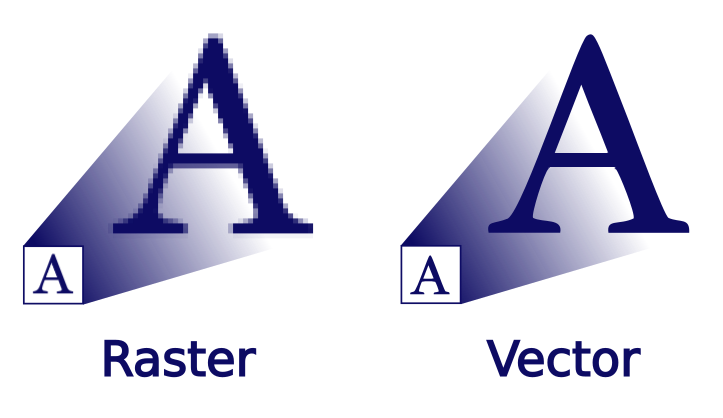
Vector graphics define an image with generic objects (curves, lines, boxes...) defined mathematically and are thus resolution independent, meaning that the image stays razor-sharp at any size. Vector images are perfect for cutting and engraving machines, high quality print jobs, logo design, illustration, etc.
Finally, vector files (such as SVG files) are often much smaller than the equivalent raster files (such as JPEG files) and are useful for web designers to create icons, logos and simple illustrations.
Pricing model
The VectorEZ demo is available for free to test the application capabilities. It runs the same algorithm and performs the same vectorization as the full application. Try the demo right now, without the need to sign up!
The demo application is only limited by the fact that the result cannot be saved as a SVG file. But the user can still export a rendering of the vectorization in PNG.
The pricing model of the full application is a one-time purchase. No subscription, no additional in-app purchase. Buying the application grants a license for a single user, and the installation of the application on multiple machines is allowed. The user will have access to the updates of the current major release (currently, 1.x), that can be downloaded from this website.

VectorEZ Demo
Free
- ✔Try the application for free
- ✔No account needed
- ✔Desktop application for Windows and macOS
- ✔Export the vectorization to PNG
- ✘Cannot save the result to a vector format
VectorEZ Full
18€ ($21)
- ✔One-time purchase
- ✔Includes future updates (1.x releases)
- ✔Desktop application for Windows and macOS
- ✔Export the vectorization to PNG and SVG
- ✔Unlimited saves to SVG files
Features
- Transform a raster image to vector graphics
- Single-channel tracing (one color)
- Extract a vector silhouette from any bitmap image
- Adjust the vectorization precision, preview the result in real-time
- Fast and intuitive, ideal for beginners, makers and hobbyists
- Supported input image formats: BMP, JPEG, PNG, TGA and TIFF
- Save the vectorization in vector format: SVG (Not available in the demo version)
- Export the vectorization to bitmap format: PNG
- Metrics related to the vectorization result: Number of contours, number of nodes
- Visualize the nodes of the Bezier curves